
SEO Tips for Beginners: A Simple Guide to Better Google Rankings
SEO Tips for Begginers can help website owners understand how to improve their visibility on Google and attract more relevant visitors. If you have recently created a website, publishing content alone may not be enough to bring consistent traffic. You also need to make your pages useful, easy to navigate, and understandable to search engines. By learning the basic SEO process, you can gradually improve your website and build a stronger online presence.
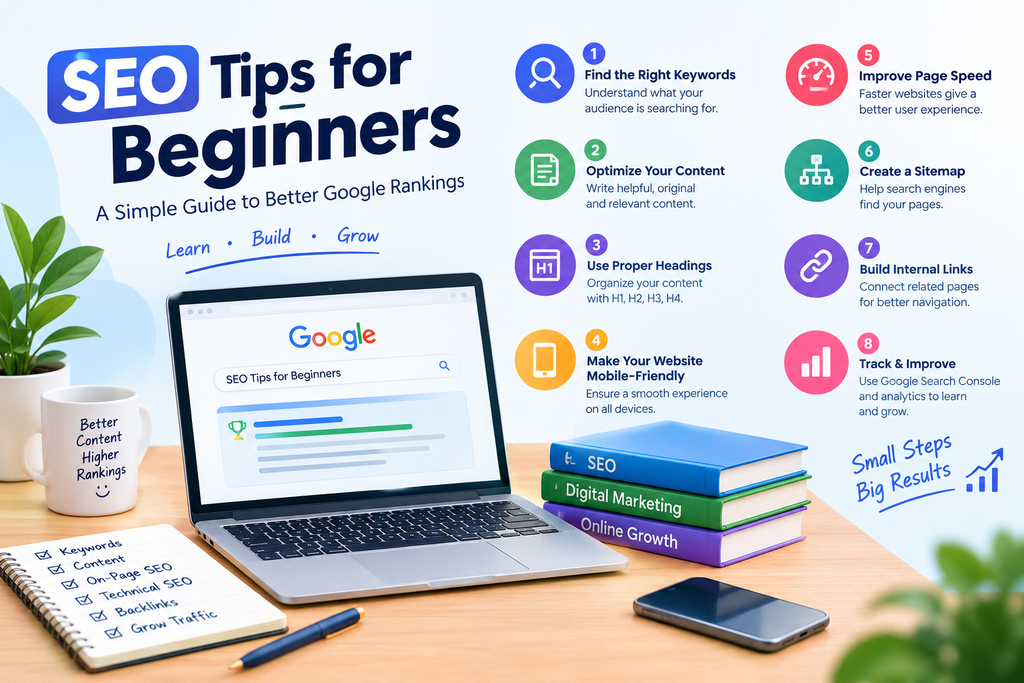
Table of Contents
SEO Tips for Beginners: Understand the Basics of SEO
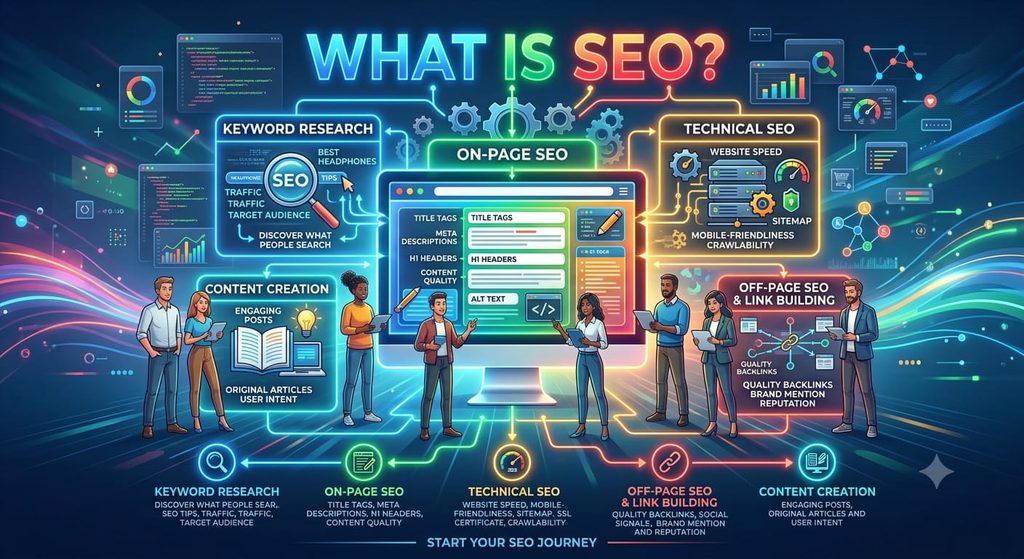
SEO Search Engine Optimization, or SEO, is the process of improving a website’s visibility in organic search results. It includes keyword research, content optimization, technical improvements, and creating a better experience for visitors. These SEO Tips for Beginners provide a starting point without making the process unnecessarily complicated.
1. SEO Tips for Beginners Research Relevant Keywords
Keyword research helps you discover the words people use when searching for information, products, and services. For example, someone learning SEO may search for “SEO while a business owner may search for digital marketing services in Delhi.
Choose keywords that match the purpose of your page. Google Search suggestions and Google Keyword Planner can help you explore relevant ideas.
Choose Keywords Based on Search Intent
Search intent means understanding what a person expects to find. Someone searching for beginner SEO advice usually wants clear explanations and practical steps. Create content that meets that expectation instead of filling the page with repeated keywords.
SEO Tips: Improve On-Page SEO
On-page SEO involves improving elements within your website, including titles, headings, content, images, and internal links. These SEO tips can help you organize your pages so visitors can understand them easily.
2. SEO Tips for Beginners Write Clear SEO Titles and Meta Descriptions
Your SEO title should describe the page accurately and include the focus keyword naturally. For this article, “SEO Tips A Simple Guide to Better Google Rankings” clearly tells readers what they can expect.
A meta description should briefly summarize the page and SEO explain why it may be useful. Google can generate a different search snippet depending on the user’s query, so a custom description is not guaranteed to appear exactly as written.
Make Each Title Unique
Avoid using the same title on several pages. Give every important page a distinct title that reflects its content and purpose.
3. SEO Tips Organize Content With Headings
Headings make articles easier to scan and help readers understand the structure of a page. Use H1 for the main heading, H2 for major sections, H3 for subsections, and H4 when a smaller heading is helpful.
These SEO Tips work best when headings describe the content clearly. You can include your focus keyword in relevant headings, but you do not need to force it into every heading.
Keep Headings Natural and Useful
A heading should tell readers what the next section explains. Avoid repeating the exact same phrase in every heading simply to increase a plugin score.
SEO Tips: Create Helpful Content
Search engines aim to show people useful results that meet their needs. Therefore, your article should answer the reader’s question rather than simply repeat a keyword.
4. SEO Tips Write Original and Valuable Articles
Before writing, identify the main question your audience wants answered. Explain the topic in simple language, include relevant examples, and check that your information is accurate.
For a digital marketing website, useful topics might include keyword research, local SEO, website optimization, or Google Ads. Each article should have its own purpose and provide information that genuinely helps readers.
Update Content When Needed
Review older articles when information changes or when you can make them more useful. Correct outdated details and add relevant explanations. Avoid changing content merely to make it appear fresh.
SEO Tips: Improve Technical Performance
Technical SEO helps search engines discover and process your website pages. A technically accessible website also makes it easier for visitors to use your content.
5. SEO Tips for Beginners Improve Website Speed and Mobile Usability
Your website should work well on smartphones, tablets, and desktop computers. Text should be readable, menus should function properly, and contact forms should be easy to complete.
Compress large images, use appropriate image sizes, and remove unnecessary features that slow down your pages. Google PageSpeed Insights can help identify performance issues worth fixing.
Add Descriptive Image Alt Text
Alt text describes an image for people who cannot see it and helps provide context when images are unavailable. For the main infographic in this article, an appropriate description could be “SEO infographic showing eight basic SEO practices.”
Use descriptions that accurately represent each image. Do not use the same keyword-stuffed alt text on every image.
6. SEO Tips for Beginners Use Google Search Console
Google Search Console helps website owners monitor search performance, including impressions, clicks, queries, and indexing information. It can help you identify pages that receive search visibility and discover potential technical problems.
Submit your sitemap when appropriate and inspect important URLs if they are not appearing in search results. Remember that submitting a sitemap does not guarantee indexing or higher rankings.
SEO Tips for Beginners: Build Internal Links and Earn Trust
Links help visitors discover related information and can help search engines find pages on your website. A sensible linking structure also makes your content easier to navigate.
7. SEO Add Relevant Internal Links
Internal links connect one page on your website to another. For example, this beginner’s guide could link to a relevant article about local SEO or a page describing your digital marketing services.
Use Descriptive Anchor Text
Clickable text should give readers a clear idea of what the linked page contains. Add links when they provide useful additional information, not just to increase the number of links.
8. SEO Tips for Beginners Earn Relevant Backlinks Naturally
Backlinks are links from other websites to yours. Relevant links can help people discover your content and may contribute to how search engines assess your website’s reputation.
Publish useful resources, build relationships with relevant publishers, and contribute original articles where appropriate. Avoid buying links intended to manipulate rankings or publishing large numbers of repetitive posts solely to create backlinks.
SEO Tips for Beginners Final Thoughts
SEO is an ongoing process, not a one-time task. These SEO Tips for Beginners cover the main areas to focus on: relevant keyword research, clear headings, helpful content, technical performance, internal linking, and search monitoring.
Start with the pages that matter most to your business and improve them step by step. Use Google Search Console to monitor progress and update your strategy based SEO on actual results. Consistent, useful work can help you build a better website, although no keyword density or heading structure can guarantee a particular SEO Google ranking if you want to skyrocket your knowledge then [click here].